
If you are working in the creative industry in 2026, you know the pressure. The “Content Gold Rush” hasn’t slowed down; it has simply changed shape. We aren’t just making static images anymore; we are building immersive AR experiences, high-fidelity video content, and AI-assisted branding packages—all on tighter deadlines than ever before.
In this high-stakes environment, the biggest bottleneck isn’t talent; it’s assets. How much time do you spend hunting for the “perfect” font, a high-quality stock video, or a website template that doesn’t look like a 2015 relic?
Enter Envato Elements. For years, it has been the “all-you-can-eat” buffet of the design world. But as we move through 2026, with free AI generators popping up everywhere, the question is: Is Envato Elements still the best $16.50 you can spend on your business?
I’ve used Elements for over five years across three different agencies. Here is my honest, “no-fluff” review of whether this platform is your secret weapon or just another monthly drain on your bank account.
I. What Exactly is Envato Elements in 2026?
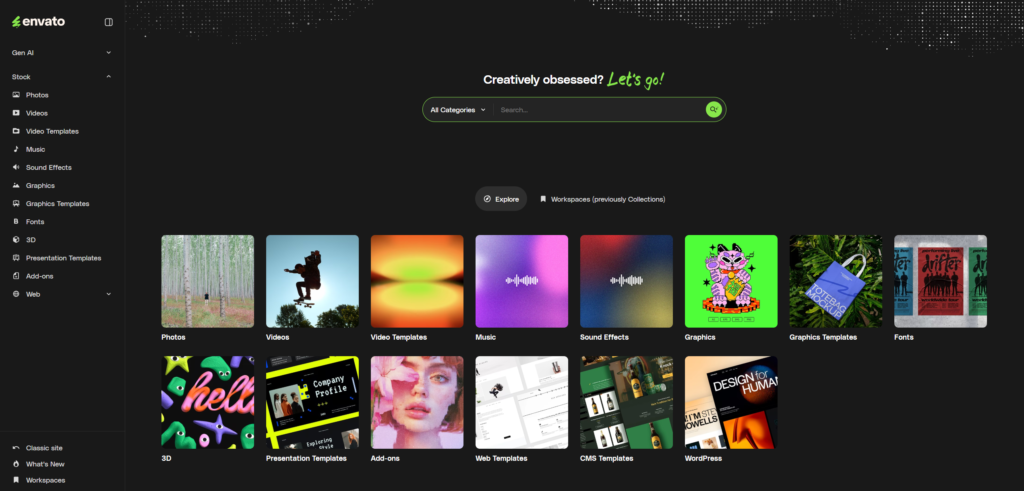
At its core, Envato Elements is a subscription service that provides unlimited downloads of millions of creative assets. Unlike its sister site, GraphicRiver (where you pay per item), Elements gives you the keys to the entire kingdom for one flat monthly fee.
In 2026, the library has ballooned to over 16 million items, covering:
- Video Templates & Stock Footage (The backbone of modern social media).
- Graphic Templates (Logos, flyers, UX/UI kits).
- Fonts (Thousands of licensed, high-end typefaces).
- Music & Sound Effects (Royalty-free tracks for every mood).
- 3D Objects & AR Assets (The fastest-growing category this year).
- WordPress Themes & Plugins (Professional tools for web developers).
II. The “AI Evolution”: How Envato Stayed Relevant in 2026
Many people thought AI image generators would kill stock sites. They were wrong. If anything, AI has made curated platforms like Envato more valuable.
2.1 The Search for Human Quality
While AI can generate a “cool” image, it struggles with consistency and technical precision. If you need a 12-page brochure template that is print-ready with 3mm bleeds, AI can’t do that reliably yet. Envato can. In 2026, Envato has integrated its own AI Search Engine, which understands “context.” You no longer search for “blue background”; you search for “calm, corporate aesthetic for a healthcare tech startup,” and the results are eerily perfect.
2.2 AI-Powered Asset Customization
New for 2026 is the “Live Preview Edit” tool. You can now take a mockup or a social media template within Envato and swap colors, text, and images using an AI-assisted interface before you even download the file. This saves hours of “Download -> Open in Photoshop -> Realize it’s the wrong file -> Repeat.”
III. Breaking Down the Library: Where the Real Value Lies
To understand if the ROI is there for you, we need to look at the specific “Food Groups” of the Envato library.
3.1 Video is King (Templates and Footage)
If you are a YouTuber, a social media manager, or a video editor, the Video Templates section alone justifies the subscription.
- DaVinci Resolve, After Effects, and Premiere Pro: The library includes thousands of transitions, lower thirds, and intro sequences. In 2026, these are modular, meaning you can drag and drop your content and have a “pro-level” edit in minutes.
- Stock Footage: With 4K and 8K footage becoming the standard, buying individual clips at $70 each is a financial nightmare. Envato gives you unlimited clips of everything from drone shots of Tokyo to intimate lifestyle scenes.
3.2 The Designer’s Secret: High-End Mockups
Client presentations are won or lost on Mockups.
- The Envato Advantage: Instead of flat images, Envato offers 3D-mapped mockups. Whether you are showing a logo on a high-end perfume bottle or a UI on the latest 2026 foldable smartphone, these assets make your work look expensive.
3.3 Fonts: The Hidden Money Saver
Licenses for “premium” fonts can cost hundreds of dollars for a single project. Envato includes over 30,000 fonts with a commercial license. From brutalist sans-serifs to elegant scripts, you will never have to buy a font again.
IV. The Licensing: The “Simple is Better” Approach
The biggest headache for freelancers is legal compliance. Most stock sites have “Standard,” “Extended,” and “Enterprise” licenses that are a nightmare to navigate.
Envato’s 2026 License is refreshingly simple:
- One License for All: Everything you download is covered by a single, broad commercial license.
- Lifetime Use: If you download an asset and use it in a project while your subscription is active, you can keep using it in that project forever, even if you cancel your subscription later.
- Peace of Mind: No more worrying about “view counts” or “broadcast rights” for 99% of use cases.
V. Envato Elements vs. The Competition (The 2026 Landscape)
How does it stack up against the other giants?
| Feature | Envato Elements | Adobe Stock | Canva Pro | Artgrid / MotionArray |
| Asset Variety | All-in-one (Video, Web, Audio) | Photos/Video Focused | Design/Templates | Video/Audio Focused |
| Pricing | Best Value ($16.50/mo) | Expensive ($29+/mo) | Cheap ($12/mo) | Mid-range ($30+/mo) |
| Download Limit | Unlimited | Capped Credits | Unlimited | Unlimited |
| Best For | Multi-disciplinary Creatives | High-end Enterprise | Social Media Managers | Filmmakers |
Why I Choose Envato Over Adobe Stock
Adobe Stock is great if you need that one very specific, award-winning photograph. But for 90% of creative work—mockups, icons, UI kits, and music—Adobe is too expensive. Envato’s “Unlimited” model encourages experimentation. You can download 50 different fonts to see which one fits, without worrying about burning through credits.
VI. The Financials: Doing the Math (ROI)
Let’s look at a typical project for a freelance designer in 2026:
- Project: Brand Identity for a local cafe.
- Assets Needed: 2 Fonts ($40), 1 Website Template ($60), 5 Stock Photos ($50), 3 Mockups ($30).
- Total Cost (Ala Carte): $180.
- Envato Elements Monthly Cost: $16.50.
By using Envato, you save $163.50 on a single project. If you do just two projects a month, the subscription pays for itself nearly 20 times over.
VII. The “Cons”: What I Don’t Like
No review is honest without the negatives. Here are the “pain points” of Envato Elements in 2026:
- The “Everything” Problem: Because there is so much content, there is some “filler.” You will occasionally find older templates from 2018 that haven’t been updated. You have to use the “Sort by Newest” filter to find the gold.
- WordPress Support: While you get the themes and plugins, you don’t get author support. If you have a technical bug with a theme, you’re on your own (or you have to buy a separate license on ThemeForest).
- AI Saturation: As more people use these assets, you might start seeing the “popular” templates everywhere. You need to customize them to keep your work unique.
VIII. Conclusion: Is It Worth It?
If you are a casual hobbyist making one Instagram post a month, Envato Elements might be overkill. You can probably get by with free tools.
However, if you are a Professional Creator, Freelancer, or Agency Owner, Envato Elements is, quite simply, the best value in the industry. It removes the “friction” of creation. It allows you to say “Yes” to client requests you previously didn’t have the assets for. It’s the closest thing to a “Cheat Code” for professional design.
My Recommendation:
- Try the Monthly Plan first: If you have a big project coming up, sign up for a month, download everything you need, and see if it fits your workflow.
- Go Annual for the Discount: If you find yourself using it more than twice a week, the annual plan drops the price significantly.
🚀 Ready to Level Up Your Creative Game?
In the fast-paced 2026 market, you can’t afford to waste hours hunting for assets. Give yourself the freedom to create without limits.