
In 2026, the concept of a “desk” has shifted. It’s no longer just a flat surface where you park your laptop; it is a bio-dynamic environment designed to protect your focus, posture, and mental energy. After testing hundreds of setups—from minimalist Scandinavian nooks to high-tech “CEO cockpits”—I’ve realized that productivity isn’t about working harder; it’s about reducing the friction between your brain and your tools.
The following list isn’t just a collection of gadgets. These are the specific, high-ROI desk tools that I personally believe will define professional excellence this year. If you’re looking to transform your workspace into a high-performance zone, here is the ultimate 2026 guide.
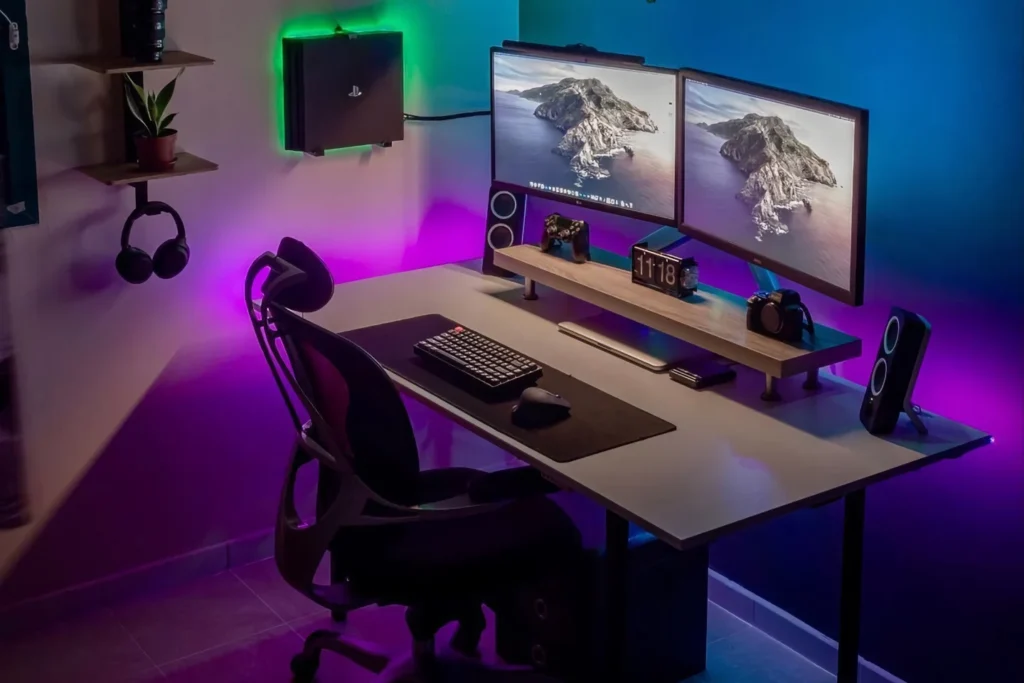
The 2026 Desk Setup: Tools That Bridge the Gap Between Comfort and Deep Work
I. The “Command Center” Essentials (Ergonomics)
You cannot be productive if you are in pain. In 2026, ergonomics is the foundation of any serious workflow.
1. The Smart Standing Desk (The Base)
A desk that stays at one height is a relic of the past. Modern productivity requires movement. I recommend looking for a dual-motor standing desk with four memory presets.
- The ROI: Alternating between sitting and standing every 90 minutes prevents the “afternoon slump” and keeps your circulation—and your brain—active.
- Pro Tip: Look for models with integrated cable management trays. A messy desk is a messy mind.
2. Monitor Arms: Reclaiming Your Real Estate
Most people settle for the stand that comes in the box. That’s a mistake. A heavy-duty monitor arm allows you to float your screen at the exact eye level required for your height, preventing “tech neck.”
- The Benefit: By lifting the monitor, you reclaim 20% of your desk surface, giving you space for a physical notebook or tablet.
II. Lighting: The Underrated Focus Hack
Lighting is the most ignored factor in productivity. Most office lights are either too dim (causing eye strain) or too “clinical” (killing your mood).
3. The Monitor Light Bar (e.g., BenQ ScreenBar Halo 2)
This is my #1 “instant upgrade.” Unlike traditional lamps that take up desk space and cause screen glare, a light bar clips onto the top of your monitor.
- Why it works: It illuminates your workspace with flicker-free, asymmetric light, meaning the light hits your keyboard and papers but never your screen.
- 2026 Feature: Look for bars with Auto-Dimming sensors that adjust the color temperature based on the time of day, helping your body maintain its natural circadian rhythm.
III. The Interface: Precision Tools for the Hand
Your mouse and keyboard are your primary interfaces with your business. If they feel mushy or uninspired, your work will reflect that.
4. The Logitech MX Master 4 (The GOAT of Productivity)
The MX Master series has been the gold standard for years, and the 2026 iterations continue to dominate.
- The Thumb Scroll: Being able to scroll horizontally through massive spreadsheets or video timelines with your thumb is a literal life-saver.
- App-Specific Shortcuts: You can map the buttons so they perform different actions in Excel vs. Photoshop vs. Slack.
5. Mechanical Low-Profile Keyboards
In 2026, we’ve moved away from loud, “clicky” gaming keyboards toward low-profile mechanical switches (like the Satechi SM1 or NuPhy series).
- The Human Feel: These provide the tactile satisfaction of a typewriter but with a shorter travel distance, allowing for faster typing with less finger fatigue.
IV. Cognitive Tools: Managing the Mind
Productivity is 10% tools and 90% psychology. These items help manage the latter.
6. The Physical Productivity Timer
Yes, your phone has a timer, but your phone is also a distraction machine. A physical Pomodoro timer (like the Hexagon or a sand timer) provides a visual cue that you are in “Deep Work” mode.
- The Psychology: When the timer is ticking, your brain enters a “sprint” mindset. It makes the abstract concept of “time” visible and finite.
7. The Rocketbook (Smart Reusable Notebook)
For those who still love the feel of pen on paper, the Rocketbook is essential. You write your notes, snap a photo with the app, and it instantly syncs to your Notion, Google Drive, or Slack.
- Sustainability: Once you’ve filled it, you wipe the pages with a damp cloth and start over. It’s the last notebook you’ll ever buy.
V. Environment Control: Eliminating Distractions
In a hybrid-work world, your environment is often chaotic. These tools create a “bubble” of focus.
8. Desk-Friendly Air Purifiers
It sounds like a luxury, but CO2 levels and dust significantly impact cognitive function. A small, silent desktop air purifier ensures you aren’t breathing “stale” air during a 4-hour session.
9. Advanced Cable Management (Magnetic Clips)
In 2026, your desk shouldn’t have a single visible wire. Magnetic cable clips and under-desk power strips transform a chaotic tangle into a clean, minimalist “CEO cockpit.”
The 2026 “Productivity ROI” Comparison
| Tool Category | Value Added | Priority Level |
| Ergonomic Desk/Chair | Prevents physical burnout | High (Essential) |
| Monitor Light Bar | Reduces eye fatigue by 60% | High (Immediate Impact) |
| MX Master Mouse | Speeds up software navigation | Medium (Workflow Pro) |
| Smart Notebook | Digitizes analog thoughts | Medium (Creative Focus) |
| Physical Timer | Increases focus intensity | Low (Psychological Hack) |
Conclusion: Build Your “Flow State” Sanctuary
Productivity is the result of a frictionless environment. If you find yourself constantly adjusting your neck, squinting at your screen, or untangling your charger, you are leaking mental energy.
The tools listed above aren’t just “gadgets”—they are investments in your most valuable asset: Your Focus. By optimizing your physical workspace, you give your brain the permission it needs to do its best work.
🚀 Level Up Your Setup Today
Don’t wait for your next burnout to fix your desk. Start with the “Lighting” or the “Monitor Arm” and feel the immediate shift in your energy levels.